Showing posts with label DOS Tricks. Show all posts

Saturday, June 16, 2012

DOS Shortcuts


1. Ipconfig/all -> Display Connection Configuration
2. Ipconfig/flushdns -> Helps to Clear DNS cache
3. Ipconfig/displaydns -> Helps to display DNS cache information.
4. ipconfig/release -> Releases all IP address connections
5. ipconfig/renew -> Renews all IP address connections
6. ipconfig/registerdns -> Re-registers the DNS connections
7. ipconfig/setclassid -> Changes/Modifies DHCP class ID
8. control netconnections -> Netword Connections
9. netsetup.cpl -> Network setup wizard
10. ping www.facebook.com -> Tests the network connection
11. tracert -> Traces the route
12. netstat -> Displays the TCP/IP protocol sessions
13. arp -> Displays resolved MAC addresses

Saturday, October 22, 2011

How Long is Your XP been running?

Goto MS-DOS
Type systeminfo
then scroll down and find out how old is your XP........

Its the Idea

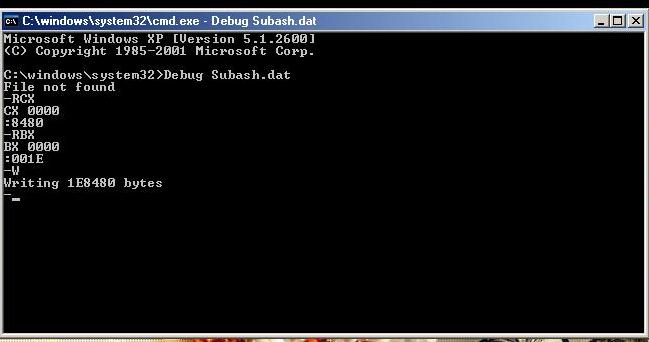
Make Unwanted Huge File

Do you want to try to make a Unwanted Huge file in your computer?
Here it goes..

*If you want to create a file of 2000000
*Convert it into Hexadecimal Using Calculator
*Answer Comes 1E8480
*Now make it 001E8480 to reach 8 digits

*Goto MS-DOS
*Note the path in MS-DOS
*Type Debug Subash.Dat
*It will say File is not found,, Ignore that message and type
*RCX and Press Enter
*Type the last 4 terms of Hexadecimal no. i.e 8480 and then enter
*Type RBX and Press Enter
*Type the first 4 terms of Hexadecimal no. i.e 001E and press enter
*Press W to write now...
*After the writing is finished Type Q to exit...


You can find the file in the path that you noted at first...

Chat with Friends in MS-DOS


Do you want to chat with your friends in Ms-Dos..
Well, Here's the idea.....


Goto Notepad

Type the following:

@echo off
echo.
echo.
:subash
CLS
echo The Brand New DOS Messenger
echo
set /p a = Ip address:
set /p b= Message:
net send %a% %b%
pause
goto subash
exit

Save it with extension .bat like "mymessenger.bat"
open it and chat with frns.... If you know their IP address....

Star Wars Movie In your Computer


 *Did you know that you have got Star Wars Movie inside your computer???
Wanna learn where is it...
Well, here it goes...


*Open your DOS, and type "telnet"
*Then type "O"
*Then type "towel.blinkenlights.nl" then Hit your Enter key
And here comes the magic.....